【Flask实战】复刻软考APS在线模拟考试系统|带Excel批量导入试题、答题卡网格、倒计时、标记作答
- 2026-10-28 07:36:44
【Flask实战】在线模拟考试系统|带Excel批量导入试题、答题卡网格、倒计时、标记作答
大家好,我是打铁的二哥,专注Python工业数字化实战。 如果你喜欢Python、Flask、APS排程、制造业数字化项目实战,欢迎关注公众号:Python学在坚持,持续分享可直接跑通的工业小工具、完整源码、避坑踩坑笔记,所有代码都经过调试,拿来就能用!
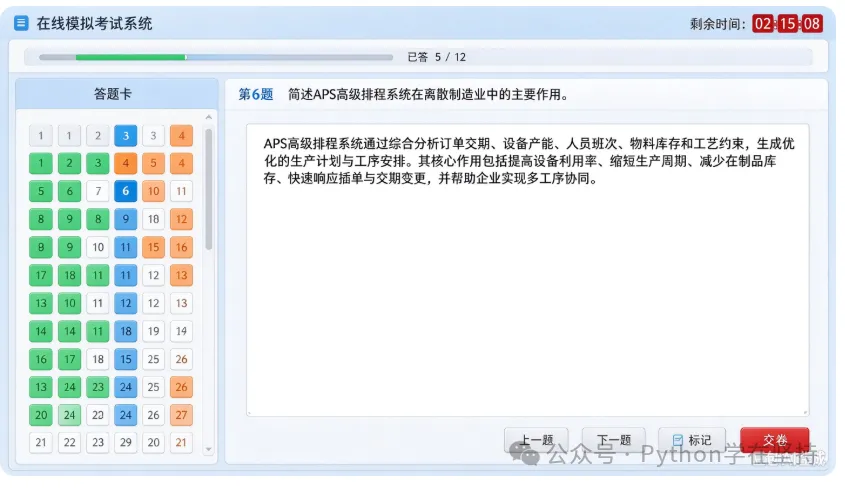
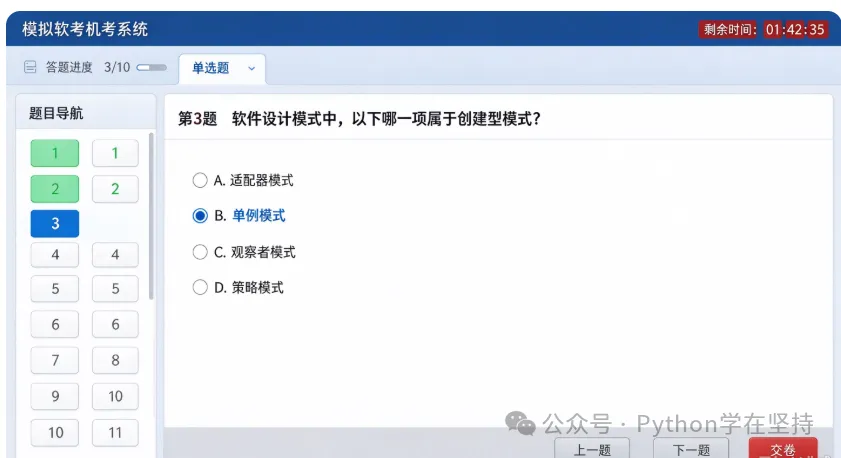
今天这套系统,是对标软考/APS智能制造面试的在线答题平台,界面和商用考试系统一致:左侧网格答题卡、顶部进度条+倒计时、单选/多选/简答三种题型、支持Excel模板导入30道甚至上百道题库、题目标记、自动判分。 之前有朋友运行时报错AttributeError: 'NoneType' object has no attribute 'strip',这份源码已经修复空单元格兼容问题,增加异常捕获,直接复制就能跑。
✅ 功能清单
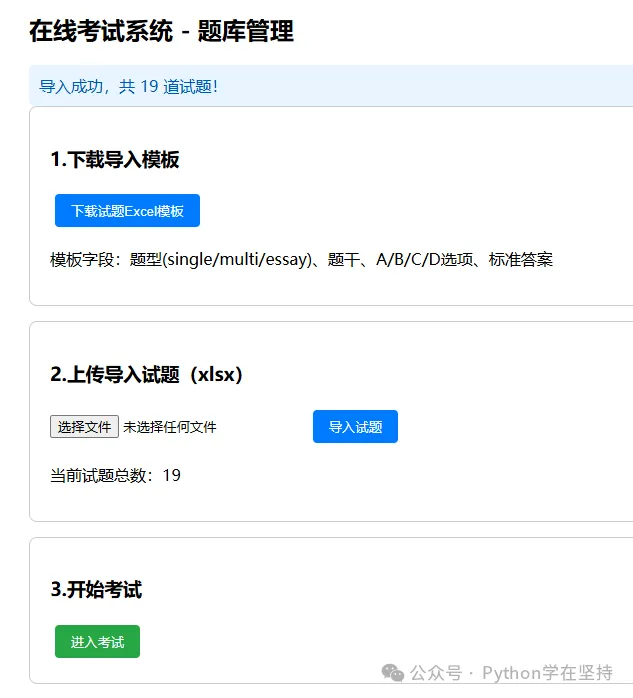
试题管理页:下载导入模板 + 上传xlsx批量导入题库 三种题型: single单选 /multi多选 /essay简答考试主界面:和截图一致,网格答题卡(未答白色、已答绿色、标记黄色、当前题蓝色) 答题功能:上一题、下一题、标记题目、交卷自动批改客观题 服务端计时,答卷保存在session,切换题目自动保存答案 容错优化:Excel单元格为空不崩溃,导入失败友好提示
📦 安装依赖
打开终端执行:
pip install flask openpyxl xlsxwriter📁 目录结构
exam_flask/├── app.py└── templates/ ├── import.html └── exam.html一、主程序 app.py
from flask import Flask, render_template, request, session, redirect, url_for, send_file, flashimport timefrom openpyxl import load_workbookfrom xlsxwriter import Workbookfrom io import BytesIOapp = Flask(__name__)app.secret_key = "exam_2026_aps_secretkey"# 试题库(内存存储,重启程序数据清空;生产环境建议换成SQLite)questions = []# 考试总时长:120分钟EXAM_TOTAL_SEC = 120 * 60def load_excel_to_questions(file):"""加载Excel试题,修复空单元格None报错问题""" wb = load_workbook(file) ws = wb.active rows = list(ws.iter_rows(min_row=2, values_only=True)) qlist = []for r in rows:if not r or not r[0]:continue# 空值兜底判断,防止.strip()报错 qtype = r[0].strip() if r[0] is not None else"" title = r[1].strip() if r[1] is not None else"" optA = r[2].strip() if r[2] is not None else"" optB = r[3].strip() if r[3] is not None else"" optC = r[4].strip() if r[4] is not None else"" optD = r[5].strip() if r[5] is not None else"" answer = r[6].strip() if r[6] is not None else"" opts = []if optA: opts.append("A." + optA)if optB: opts.append("B." + optB)if optC: opts.append("C." + optC)if optD: opts.append("D." + optD) qlist.append({"id": len(qlist) + 1,"type": qtype,"title": title,"options": opts,"answer": answer })return qlist@app.route("/")def index():return redirect(url_for("import_page"))@app.route("/import", methods=["GET", "POST"])def import_page(): global questionsif request.method == "POST": f = request.files.get("excel_file")if f and f.filename.endswith(".xlsx"): try: questions = load_excel_to_questions(f) flash(f"✅ 导入成功,共 {len(questions)} 道试题!") except Exception as e: flash(f"❌ 导入失败:{str(e)}")else: flash("⚠️ 请上传后缀为 .xlsx 的Excel文件")return render_template("import.html", q_count=len(questions))@app.route("/download_template")def download_template():"""下载Excel试题导入模板""" output = BytesIO() wb = Workbook(output) ws = wb.add_worksheet("试题模板") headers = ["题型(single/multi/essay)", "题干", "A选项", "B选项", "C选项", "D选项", "标准答案"] ws.write_row(0, 0, headers) ws.write_row(1, 0, ["single", "以下哪项是面向对象特性?", "封装", "递归", "继承", "多态", "B"]) ws.write_row(2, 0, ["multi", "哪些是开发模型?", "瀑布", "螺旋", "V模型", "马尔可夫", "A,B,C"]) ws.write_row(3, 0, ["essay", "简述APS排程作用", "", "", "", "", ""]) wb.close() output.seek(0)return send_file(output, download_name="试题导入模板.xlsx", as_attachment=True)@app.route("/start")def start_exam():if not questions: flash("⚠️ 请先导入试题!")return redirect(url_for("import_page")) session["start_ts"] = time.time() session["answers"] = {} session["marked"] = [] session["current"] = 0return redirect(url_for("exam"))@app.route("/exam", methods=["GET", "POST"])def exam(): global questionsif"start_ts" not in session:return redirect(url_for("start_exam")) qs = questions total = len(qs)if total == 0:return redirect(url_for("import_page"))if request.method == "POST": action = request.form.get("action") cidx = int(request.form.get("current_idx", 0)) q = qs[cidx] aid = q["id"] ans_dict = session.get("answers", {}) marked = session.get("marked", [])# 保存当前题答案if q["type"] == "single": sel = request.form.get("single_ans")if sel: ans_dict[aid] = selelif q["type"] == "multi": sel_list = request.form.getlist("multi_ans") ans_dict[aid] = sel_listelif q["type"] == "essay": txt = request.form.get("essay_txt", "").strip() ans_dict[aid] = txt session["answers"] = ans_dict# 标记题目 mark_flag = request.form.get("mark")if mark_flag:if aid in marked: marked.remove(aid)else: marked.append(aid) session["marked"] = marked# 页面跳转逻辑if action == "prev": cidx = max(0, cidx - 1)elif action == "next": cidx = min(total - 1, cidx + 1)elif action == "goto": cidx = int(request.form.get("goto_idx"))elif action == "submit":return submit() session["current"] = cidx cidx = session.get("current", 0) q = qs[cidx] used = time.time() - session["start_ts"] remain = max(0, EXAM_TOTAL_SEC - used) h = int(remain // 3600) m = int((remain % 3600) // 60) s = int(remain % 60) time_str = f"{h:02d}:{m:02d}:{s:02d}" ans_dict = session.get("answers", {}) marked = session.get("marked", []) done_cnt = len(ans_dict)return render_template("exam.html", q=q, qlist=qs, current_idx=cidx, remain_time=time_str, done_count=done_cnt, total_count=total, answers=ans_dict, marked=marked )def submit():"""交卷,自动批改客观题""" qs = questions ans_dict = session.get("answers", {}) score = 0 total_obj = 0 lines = []for q in qs: aid = q["id"]if q["type"] in ("single", "multi"): total_obj += 10 usr = ans_dict.get(aid) std = q["answer"]if q["type"] == "single":if usr == std: score += 10 lines.append(f"第{aid}题 ✔")else: lines.append(f"第{aid}题 ✘ 标准答案:{std}")else:if isinstance(usr, list) and sorted(usr) == sorted(std.split(",")): score += 10 lines.append(f"第{aid}题 ✔")else: lines.append(f"第{aid}题 ✘ 标准答案:{std}")else: lines.append(f"第{aid}题【简答】人工阅卷") session.clear()return f""" <h2>交卷成功</h2> <p>客观题得分:{score}/{total_obj}</p> <pre>{chr(10).join(lines)}</pre> <a href="/import">返回导入页面</a> """if __name__ == "__main__": app.run(debug=True)二、模板 templates/import.html
<!DOCTYPE html><html lang="zh-CN"><head> <meta charset="UTF-8"> <title>试题导入管理</title> <style> body{font-family:Microsoft Yahei;padding:30px;max-width:800px;margin:0 auto} .box{border:1px solid #ccc;padding:20px;border-radius:8px;margin-bottom:15px} button{padding:8px 16px;background:#007bff;color:#fff;border:none;border-radius:4px;cursor:pointer;margin:5px} .flash{background:#e8f4ff;padding:10px;border-radius:6px;color:#0056b3} </style></head><body> <h2>在线考试系统 - 题库管理</h2> {% with messages = get_flashed_messages() %} {% if messages %} <div class="flash"> {% for msg in messages %} <div>{{msg}}</div> {% endfor %} </div> {% endif %} {% endwith %} <div class="box"> <h3>1.下载导入模板</h3> <a href="/download_template"><button>下载试题Excel模板</button></a> <p>模板字段:题型(single/multi/essay)、题干、A/B/C/D选项、标准答案</p> </div> <div class="box"> <h3>2.上传导入试题(xlsx)</h3> <form method="post" enctype="multipart/form-data"> <input type="file" name="excel_file" accept=".xlsx" required> <button type="submit">导入试题</button> </form> <p>当前试题总数:{{q_count}}</p> </div> <div class="box"> <h3>3.开始考试</h3> <a href="/start"><button style="background:#28a745">进入考试</button></a> </div></body></html>三、模板 templates/exam.html(和截图界面一致)
<!DOCTYPE html><html lang="zh-CN"><head> <meta charset="UTF-8"> <title>在线模拟考试系统</title> <style> *{box-sizing:border-box;margin:0;padding:0;font-family:"Microsoft Yahei",sans-serif} body{background:#fff} header{background:#e8f2fc;padding:14px 20px;display:flex;justify-content:space-between;align-items:center} .header-title{font-size:20px;font-weight:bold} .time-text{font-size:20px;color:#c82423;font-weight:bold} .progress-wrap{margin:8px 20px} .progress-bar{width:100%;height:20px;background:#e9ecef;border-radius:10px;overflow:hidden} .progress-inner{height:100%;background:#34c759} .progress-info{text-align:right;margin-top:4px} .container{display:flex;padding:12px 20px;gap:16px} /* 左侧答题卡 */ .card-left{width:260px;border:1px solid #bdd7ee;border-radius:8px;padding:12px;height:calc(100vh - 170px);overflow-y:auto} .card-left h3{text-align:center;margin-bottom:10px;color:#2b5797} .answer-grid{display:grid;grid-template-columns: repeat(4, 1fr);gap:6px} .q-btn{padding:8px 0;border:none;border-radius:4px;cursor:pointer;font-size:14px} .q-btn.undone{background:#f3f4f6} .q-btn.done{background:#b7e1cd;color:#000} .q-btn.marked{background:#ffcc80} .q-btn.current{background:#90caf9;color:#000;font-weight:bold} /* 右侧答题区 */ .right-area{flex:1;border:1px solid #bdd7ee;border-radius:8px;padding:20px;display:flex;flex-direction:column;height:calc(100vh - 170px)} .q-title{font-size:18px;font-weight:bold;margin-bottom:16px} .opt-item{margin:10px 0;font-size:16px} .essay-input{width:100%;flex:1;border:1px solid #ccc;border-radius:6px;padding:12px;font-size:16px;resize:none} .btn-row{display:flex;gap:12px;margin-top:16px;justify-content:flex-end} .btn{padding:10px 24px;border-radius:5px;border:1px solid #aaa;font-size:16px;cursor:pointer} .btn-mark{background:#e8f4ff;color:#0056b3} .btn-submit{background:#d93025;color:white;border:none} </style></head><body><header> <div class="header-title">在线模拟考试系统</div> <div class="time-text">剩余时间:{{remain_time}}</div></header><div class="progress-wrap"> <div class="progress-bar"> <div class="progress-inner" style="width:{{(done_count/total_count)*100}}%"></div> </div> <div class="progress-info">已答 {{done_count}} / {{total_count}}</div></div><div class="container"> <!-- 左侧答题卡网格 --> <div class="card-left"> <h3>答题卡</h3> <div class="answer-grid"> {% for item in qlist %} {% set aid = item.id %} {% set is_done = aid in answers %} {% set is_marked = aid in marked %} {% set is_cur = loop.index0 == current_idx %} <form method="post" style="margin:0"> <input type="hidden" name="action" value="goto"> <input type="hidden" name="goto_idx" value="{{loop.index0}}"> <input type="hidden" name="current_idx" value="{{current_idx}}"> <button class="q-btn {% if is_cur %}current {% elif is_marked %}marked {% elif is_done %}done {% else %}undone{% endif %}"type="submit"> {{loop.index}} </button> </form> {% endfor %} </div> </div> <!-- 右侧答题区 --> <div class="right-area"> <form method="post"> <input type="hidden" name="current_idx" value="{{current_idx}}"> <div class="q-title">第{{current_idx+1}}题 {{q.title}}</div> {% if q.type == "single" %} {% for opt in q.options %} <div class="opt-item"> <label> <input type="radio" name="single_ans" value="{{opt[0]}}" {% if answers.get(q.id) == opt[0] %}checked{% endif %}> {{opt}} </label> </div> {% endfor %} {% elif q.type == "multi" %} {% for opt in q.options %} <div class="opt-item"> <label> <input type="checkbox" name="multi_ans" value="{{opt[0]}}" {% if opt[0] in answers.get(q.id,[]) %}checked{% endif %}> {{opt}} </label> </div> {% endfor %} {% elif q.type == "essay" %} <textarea class="essay-input" name="essay_txt" placeholder="在此输入简答内容">{{answers.get(q.id,"")}}</textarea> {% endif %} <div class="btn-row"> <button class="btn" name="action" value="prev">上一题</button> <button class="btn" name="action" value="next">下一题</button> <button class="btn btn-mark" name="mark" value="1">标记</button> <button class="btn btn-submit" name="action" value="submit">交卷</button> </div> </form> </div></div></body></html>🚀 使用步骤
新建文件夹,按目录结构放好3个文件 执行 python app.py启动服务,访问[http://127.0.0.1:5000/import](http://127.0.0.1:5000/import)先下载模板,填充APS/软考题目,再上传导入 点击进入考试,开始模拟答题
💡 后续拓展方向(公众号后续会更新)
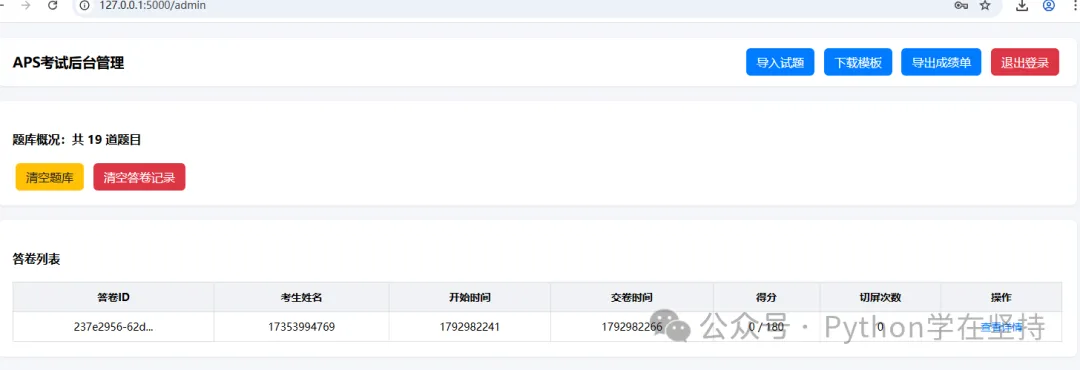
JS前端倒计时,时间到强制交卷 切屏检测,防止考生离开页面搜题 SQLite持久化题库、答卷记录,重启不丢失 增加成绩页面、导出成绩单、管理员后台
👉 后续更多Python工业实战、APS排程、上位机、Flask项目源码,欢迎大家持续关注 公众号:Python学在坚持,回复关键词获取配套素材、题库文件,一起用Python搞定制造业数字化工具!
点击【关注+收藏】获取最新的实战代码案例
特别声明:
1:接收最新文章代码,请点击下方并关注+收藏公众号!
2:有源码需求的,请关注公众号并联系作者处获取源码!
3:再次强调:本文仅供技术学习,非法用途后果自负!
基于YOLOv8轻量化模型,结合PyQt5搭建了可视化的目标检测GUI系统
【一周精选】Python做一个可视化的 mkdocs 操作工具
【一周精选】用 Python 的 Tkinter 库实现田字格纸模板工具
【一周内容精选】基于 Python Qt5 的多功能下载工具
用 Python Qt5 的 QPainter 实现 2D 图形绘制
基于 OpenCV + EasyOCR 实现真实的车牌识别功能
Python实现以 YOLOv8 轻量化模型的安全检测小工具
用 tkinter 实现一个集摄像头管理、操作(打开/暂停/拍照/保存/预览)和人员安全帽检测于一体的监控程序
基于 tkinter 开发一个符合上述规则的三张牌(金花)小游戏
Python实现中文图片文字处理器——让汉字“贴图”飞一会儿!
Python实现诊断证明书编辑器——从 0 到 1 的“土味”GUI 之旅
Python-Ai基于火山方舟&豆包API的全屏实时聊天应用
用Python打造汉字笔画查询工具:从GUI界面到笔顺动画实现
Python超实用 Markdown 转富文本神器 —— 代码全解析
【实战1】
【实战2】
python-win32等实现exe自动添加到电脑自启动选项
PySimpleGUI-checkboxPython实现图片截取成九宫格
【实战3】
【实战4】

